Morse Code Audio Decoder
Upload a Morse audio file or use your microphone to decode into text instantly.
What is Morse Code Audio Decoder?
The Morse code adaptive audio decoder is a powerful tool for converting Morse audio files into simple and clear English text instantly within seconds. This audio decoder analyzes input Morse signals (dots and dashes) and translates them into text in real-time decoding. Moreover, you can also play your Morse code audio. This tool provides you satisfied user experience as it decodes accurately.
Why do you need a Morse Code Audio Decoder?
We need an online audio decoder because decoding audio manually is much harder in a noisy background, which sometimes causes wrong audio decoding. This Morse audio decoder helps you to decode audio files accurately without wasting time in manual decoding. This tool is widely used for experimental purposes.
How to use the Morse Code Audio Decoder?
It’s very easy to use our simple Morse code audio decoder. Just follow these easy steps.
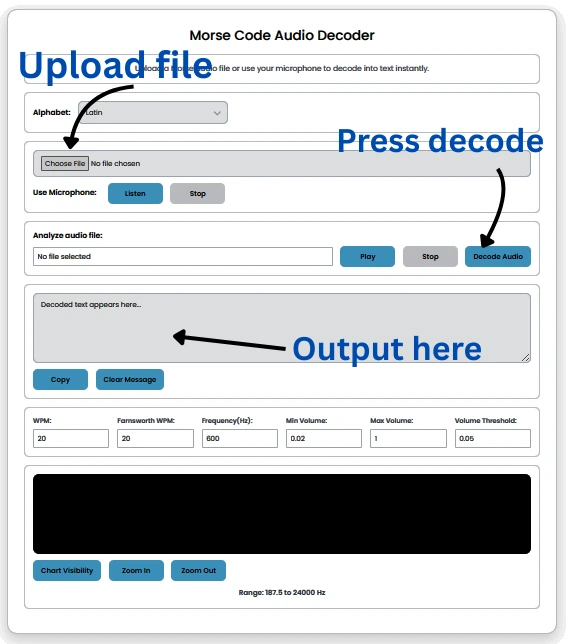
- Start by uploading an input audio file or using a microphone for input.
- Select an alphabet language such as Latin, Hebrew, Arabic, Persian, or Japanese. Latin is the default.
- Press the play button to listen to the Morse code audio file.
- You have to tap the “Decode” button to transform the input file into plain text. Now, you can see the text in the desired box.
- Press the copy button to copy the decoded output.
- If you want to empty the output box, click the clear button to remove output.
- Our tool also shows Morse code waves. You can see real-time decoding signals in the chart at the bottom.
Pros of using Audio Decoder
Speed and Accuracy: The Morse code audio decoder provides you with fast and accurate Morse audio file decoding in just one click. Our tool reduces human error in decoding files and provides output without a single error.
Reliable Decoding: The Morse code audio decoder analyzes signals automatically and provides you with accurate results. This tool helps you to reduce manual decoding errors and provides you with exact and reliable decoding
Time Saving: Manual decoding is time-consuming and raises accuracy concerns for beginners, whereas this advanced audio decoder automatically converts audio files and delivers accurate results in seconds.
Cons of Manual Decoding
Inefficiency: Manual decoding consumes much time as we need to listen to Morse code carefully, and it requires skills and experience. Manual decoding also has doubts about errors, and it will not be as accurate as a tool.
Human Errors: While manual decoding by beginners, there must be human errors in decoding because manual decoding need highly skill and experience.
Noisy Environments: It’s a challenge for a manual decoder to decode Morse in a noisy environment, which causes errors.
What are the features of this Morse Code Audio Decoder?
- Upload Morse Audio File
You can upload a Morse audio file as input to decode it into text instantly. If you don’t have an audio file, then use our Morse code translator to generate or save a file. - Decode Morse with Microphone
Another option is to use a microphone for input. Note: Some browsers may ask for permission or will not allow it.Recommended audio file. - Support for Multiple Alphabets
Our tool provides you with multiple language support, such as Latin, Cyrillic, Greek, Hebrew, Arabic, Persian, Japanese, Korean, and Thai. Latin is the default. - Audio Play and Stop Controls
After uploading the input, you can also play the Morse audio file and press the stop button to pause the audio playback. - Instant Decoded Text Output
Our tool provides you with instant results in seconds just after you click on the decode button, and the result will appear in the box below. - Copy and clear
You can copy your output just by clicking on the copy button, and clear the empty output box by clicking on the clear button. - Audio Signal Visualization
Not only do you play, decode, copy, and clear output, but you can also see a live decoding sound waves visualization chart that helps you to understand Morse code sound just by analyzing dot and dash waves.
Tips for best results
- Upload an audio file which have no background noise, and for that use a Morse code translator.
- Make sure the audio file has good timing or speed.
- Give space between letters to decode text in sequence and make it understandable.