Morse Code Translator
Generate Morse code from text, or decode Morse to text instantly — with realistic audio playback, adjustable speed, smart decoding, downloadable audio, and seamless sharing of messages.
Adjust sound, speed, spacing, and playback options.
Each preset sets Speed and Farnsworth together.
A complete quick reference for International Morse letters, numbers, punctuation, common signals, and Morse timing.
The light follows the current Morse output: short flashes for dots and long flashes for dashes.
Your device will vibrate using the current Morse output. This feature depends on browser and device support.
Try a phrase
Tap any phrase to load it into the translator
Online Morse Code Translator & Generator – Text to Morse & Morse to Text
Easily convert text into Morse code and Morse code to text with our free online Morse Code Translator. Input your text, receive an instant and accurate conversion, and enjoy the additional functionalities of copying, sharing, listening to, and downloading your Morse code.
No matter what you’re planning to do – whether it is to convert a message, decipher dots and dashes, learn the Morse Code alphabet, practice Morse by audio, or play around with Morse codes – our online morse translator provides you with all the necessary tools in one place.
Our morse code translator works bidirectionally to convert regular text into Morse code and vice versa, allowing it to be used by students, teachers, ham radio operators, puzzle solvers, developers, and all other people interested in Morse Code technology and using a Morse generator.
What is Morse Code?
Long before phones or the internet, Morse code let people send messages across oceans and battlefields using nothing but dots and dashes. Each letter has its own pattern — E is a single dot(•), T is a single dash(—), and those patterns get beeped, flashed, or tapped out to spell real words. Morse code was invented in the 1830s by Samuel Morse, turning letters, numbers, and symbols into a rhythm simple enough that anyone could learn it, and reliable enough to carry a message when nothing else could.
Morse code is kind of fantastic when you think about it — only two symbols, a dot and a dash, and that’s enough to spell out anything from a quick “HELLO” to an emergency “SOS.” The best part is you don’t need to memorize anything to start exploring it.
What is Morse Code Translator?
If you are looking for an accurate, free Morse code translator online, then you have landed on the right spot. Our Morse code converter converts normal text into Morse code instantly. Moreover, you can translate Morse code to English back to normal text easily, which shows that the message can be encoded and decoded in simple terms using the Morse code generator or Morse code maker. This simple Morse code decoder online is perfect for students, radio operators, or anyone learning Morse Code.
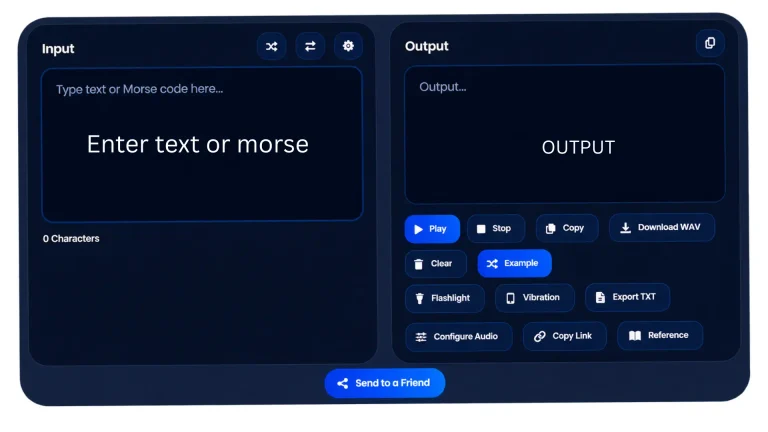
Enter your message into the Morse code generator to turn text into dots and dashes. A conversion from word to Morse code can be done by entering the word in the input field.
How to use the Morse Code Translator?
Our free Morse code generator automatically detects text or Morse code. Just enter your input and get output instantly.
Start using the Morse code converter now and get your message converted in three simple steps. No downloads or frustrating setups. Our translator allows you to translate to Morse code instantly…, and also Morse code to text with high accuracy, whether you are using it to convert simple sentences such as Hello in Morse code or to decode emergency messages across borders. You can get accurate, fast, and reliable Morse code translation.
Type your message
Paste or enter Morse code symbols or text into the Morse code translator input box. You can type Morse code dots and dashes or English words. Our Morse Code translator to text will turn your Morse code messages into text in an instant by automatically detecting the input.
On-the-spot Translation
See how the Morse symbols translator will provide output in a blink and translate Morse symbols to text instantly in milliseconds, accurately in real-time decoding. Save time with our Morse code creator tool.
Listen & Learn
Click the play button to hear Morse code tones in real time, much like a telegraph beeps Morse code. Not only can you hear it, but you can also view flashing lights as Morse code signals to understand how, in history, messages were sent through flashlight visualizations.
Copy, Download, and Share Your Result
Once the translation process is finished, the translation result can be copied and used elsewhere. It is very easy to save, download, or share the Morse code translation using the provided downloading and sharing options. As a quick exercise, you may choose to load a sample message rather than type one yourself.
Text to Morse Code
- To start, enter or paste your text into the input box.
- The English to Morse Code Translator will translate your message into the output field instantaneously.
- Upon conversion, you can copy and hear the message instantly or download the encoded text.
Morse Code to Text
- In the input box, paste your encoded Morse code message.
- The Morse code to English translator instantly converts your message into accurate text using International Morse code.
- After conversion, you can copy the decoded text or save the message for later use.
Morse code input rules
Correct formatting of input data is the key feature of efficient Morse code decoding.
Use Space Between Letters
Use a space for separation of individual characters of Morse code.
Correct: .... . .-.. .-.. ---
Incorrect: ......-..-..---
In the first case, each letter is clearly separated. In the second case, separators are missing which are necessary for proper decoding.
Separate Words Clearly
Use slash / for separation of words if the translator uses slash as separators.
Example: .... . .-.. .-.. --- / .-- --- .-. .-.. -..
Thus, the structure of the message becomes evident.
Keep Dots and Dashes Together
Dots and dashes of a single character should stay in one piece.
For instance: .- is A
However, in case of adding additional unnecessary space:
. - is ET
the decoder will interpret them as two different letters.
Check Unsupported Characters
Not all symbols have the official representation in International Morse code. If you want to translate text with some special characters such as emojis or other rare Unicode symbols, then the translator may not be able to translate them. It is better to make it evident for a translator.
How Morse Code Translation Works?
The Morse Code consists of only two symbols, dots and dashes. However, there are more things needed for a correct translation of the Morse code messages. The dots and dashes timing, character boundaries, and words spacing all are necessary for a readable message.
Dots and Dashes
- A dot is the short Morse signal.
- A dash is the longer signal.
All characters are composed from these two signals.
Examples:
| Character | Morse Code |
|---|---|
| A | .- |
| B | -... |
| C | -.-. |
| E | . |
| S | ... |
| O | --- |
| T | - |
This simple system can represent letters, numbers, punctuation, and various procedural signals.
Morse Code Timing
International Morse code uses standardized timing relationships:
- A dot is one time unit.
- A dash is three time units.
- The interval between elements in a character is one unit.
- The interval between characters is three units.
- The interval between words is seven units.
These timing relationships are essential for the sending and receiving the Morse code messages.
Spacing Between Letters
In written form, the Morse code uses spaces between letters.
For example:
.... . .-.. .-.. --- stands for HELLO
Each group is an individual character. Without using spaces, the decoder cannot understand when the end of one character and the start of the next letter.
Spacing Between Words
Words can be divided using / in writing the Morse code alphabetically.
For example,
.... . .-.. .-.. --- / .-- --- .-. .-.. -..
translates into
HELLO WORLD
It should be noted that not all schemes use the same methods of representation. The key thing is to maintain word division.
Text-to-Morse Encoding
Encoding involves converting a normal text message into Morse code by replacing each character that is supported by its equivalent in Morse code. Translate Morse code messages into English using our Morse code translator to text tool. Example: SOS
SOS has three characters:
S = ...
O = ---
S = ...
Hence, ... --- ...
Morse to Text Decoding
Decoding is the opposite of encoding. The Morse decoder translates each Morse character and converts it back into the equivalent letter, number, or symbol.
Features of this Morse code Translator
This Morse code tool combines translation, audio playback, sharing, learning and all features in one place.
Convert Text to Morse
Type your message or paste it into the input box. The tool will instantly and accurately convert your text into Morse code, displaying the result as dots (.) and dashes (-) in the output box. The Morse code to English translator also converts Morse code back instantly, in the same box. This tool can be used as a Morse code creator, which means that users can use it to convert any word or sentence into Morse code.
Morse Code to Text
Type or paste Morse code dots(.) and dashes (-) into the input box, and the tool will automatically convert them back into readable English. Use one space between letters and a forward slash ( / ) between words so the tool can tell where one word ends and the next begins. That is all you need to decode a Morse message, whether it originally came as a flash of light, a series of beeps, or something written on paper. The Morse code translator to English will enable you to interpret your Morse code message into English form for whatever use. You will be able to convert Morse code to text and interpret dots and dashes as an ordinary message. The Morse text generator will also create Morse messages from words and sentences in seconds.
Copy and Share
Both the text and Morse code boxes have their own copy button, so you can quickly grab whichever version you need. There is also a share option if you prefer to send the translation directly rather than copying and pasting it yourself.
Send It as a Puzzle
Convert a message into a shareable link instead of plain text and send it to someone as a small puzzle for them to figure out. It is a fun way to use the translator that most similar tools do not offer.
Try a Random Message
Not sure what to type? Hit the Example button to load a ready-made text or Morse sample to test yourself on. It is great for quick practice or just seeing how well you can read something you did not write yourself.
Play Morse Code Audio
Using the play feature, you can hear your message as actual sounds, where dots produce short beeps and dashes produce longer ones. Open the settings to adjust playback to your preference:
- Sound type: CW radio tone
- Pitch: Set the tone frequency to whatever feels comfortable
- Volume: As loud or as quiet as you need
- Speed (WPM): Controls how fast the message plays, ranging from beginner pace to fast and advanced
- Farnsworth speed: Keeps each letter at a natural rhythm while extending the gaps between them, helping you learn to recognize letters by ear rather than counting individual dots
- Word separator toggle: Turn the slash ( / ) between words on or off
Keep Track As You Go
Just below each box, you will see a live count of how many characters you have typed and how many total signals that amounts to, updating in real time as you work. This is useful for keeping an eye on message length or understanding how many dots and dashes make up a given sentence. It also helps when monitoring transmission size.
Download Morse Code
You can save your output as a WAV audio file to use later or share wherever you need it.
User-Friendly Interface
The tool has a simple, clean design that makes it easy to understand what to do at every step.
Sound Customization
Morse code sound settings cover playback speed, tone frequency, and volume control, giving beginners and practicing users a better overall experience.
Volume (0–100)
Set the playback volume from 0 to 100 with the Volume control in the translator’s Configure Audio panel.
Speed (WPM)
Adjust the Morse code playback speed, for example 25 words per minute, to match your level, whether you are a beginner, intermediate, or advanced learner.
Pitch (Hz)
Adjust the tone frequency, for example 515 Hz, to make the sound clearer and more comfortable to listen to.
Word Separator (“/”)
The word separator displays a forward slash to represent spaces in Morse code, making it easier to read and decode messages accurately.
Free and Unlimited
This Morse Code Translator requires no sign-up or subscription. You can translate as much text as you like with no restrictions of any kind.
See the Morse Code Translator in Action
Our Morse Code Translator will be more functional when you know precisely what each button is used for. Our translator is designed to unite all text to Morse translation, Morse codes pronunciation, sharing, and training possibilities in one convenient interface. Whatever you do – whether you learn the Morse code alphabet, check your message or want a morse code alphabet translator for immediate use, you will be able to translate and test it immediately. Below is a quick look at the main features and how to use them.
Convert Text to Morse Code Instantly
Begin with typing the word, sentence, or any other type of text that is supported into the Input section. Morse code writer tool will automatically convert your text into International Morse Code and present the outcome in the Output section. You can also use the swap button to reverse the direction of translation and decode Morse code into the text format.
Therefore, the tool is suitable for as both a text to morse converter and a Morse code to text translator. As an illustration, input HELLO to see how it looks in Morse code. On the contrary, if you want to decode the message in Morse code, click on the swap button first.
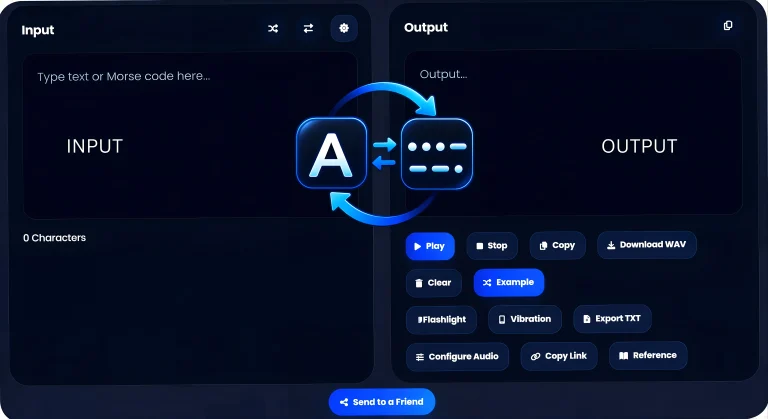
It is a simple process, and therefore it becomes very easy to translate English to Morse code at once. This method is helpful not only for the beginners who practice Morse code but also for those people who study the communication systems and teach radio amateurs.
Play, Stop, Copy, and Download Morse Audio
Once your Morse code is generated, there is much more that you can do apart from reading it. Click on Play in order to listen to your message as Morse audio, and then click Stop to stop the playback. The Copy option enables you to copy the Morse code easily to the clipboard, while the Download WAV option allows you to download the Morse code in the form of WAV audio. If you prefer text copy of your Morse code, you have the Export TXT option too.
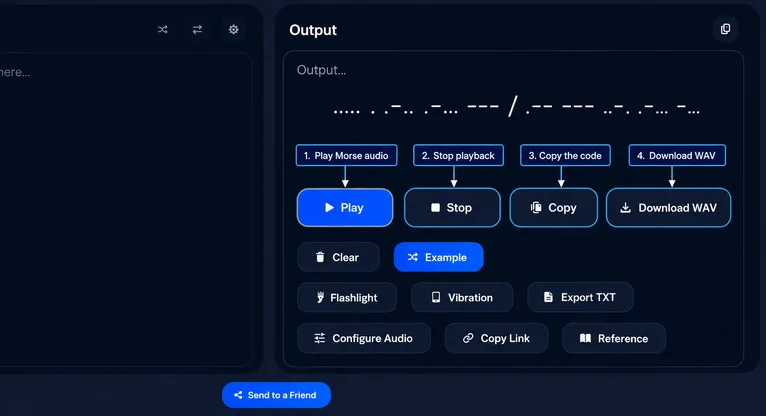
This is especially helpful when you are trying out Morse code by hearing it. Rather than just reading the codes, you hear the dots and dashes being sounded, and you get used to how Morse code sounds and become more familiar with the rhythm of Morse transmission.
Try an Example or Clear the Translator
Not sure what message to translate? Choose Example to insert a sample message and translate it right away. This is a fast method to try out the application without inputting your own text.
Pressing Clear at the end will clear the entered text for a fresh translation.
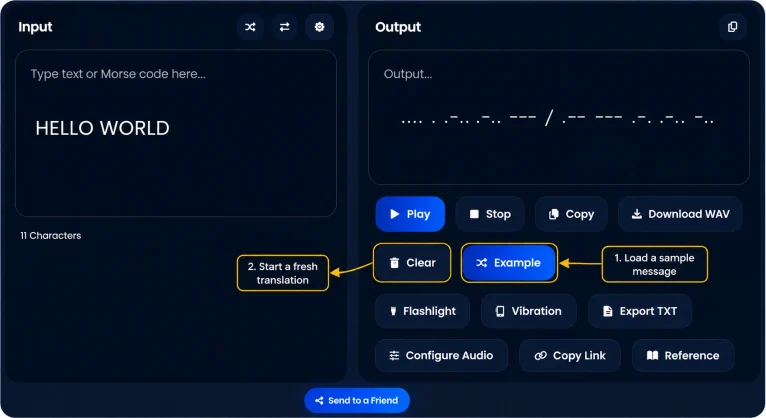
This is especially useful for new users who want to comprehend how the translator functions before typing in their message.
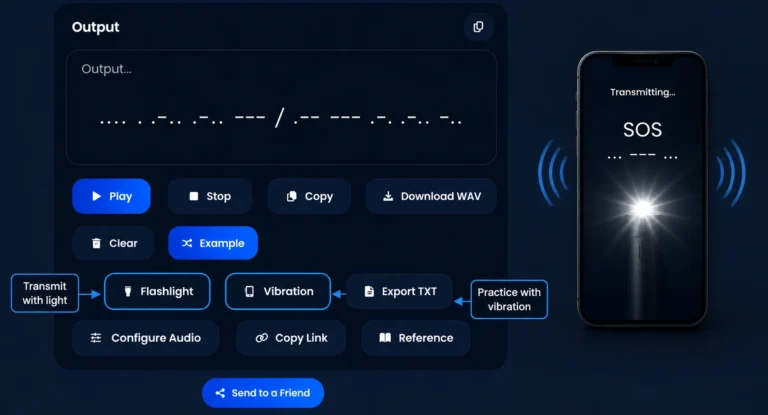
Practice Morse Code With Flashlight and Vibration
Also, there are interactive options that allow one to practice sending Morse codes. For example, the Flashlight option is able to simulate the Morse signal by the means of light flashes, while the Vibration allows for feeling the Morse code. Short vibration and flash signals is for dot (.) and long is for dash (-). It can help you diversify your practice of Morse recognition as you will not be restricted to see only how the dots and dashes look on the computer screen.
Adjust Morse Code Speed and Audio Settings
Adjust the Morse code audio according to your current proficiency level. Using the Audio & Morse Settings tab, you will be able to control WPM speed, pitch, volume, sound type, and Farnsworth spacing to have a more comfortable listening experience.
You should select one of the presets – either Beginner (5/5), Casual (13/10), Standard (20/15), or Expert (35/25) and manually adjust the settings if necessary. WPM sets the speed at which Morse characters are played, whereas Farnsworth spacing increases the time between each character to make it easier to recognize Morse code by listening.
Additionally, you can choose the CW Radio Tone, adjust its pitch and volume, use Auto Play function, and treat / as a word separator. All these features make the Morse translator helpful for learning Morse code, practicing listening skills, and recognizing dots and dashes without depending on a visual Morse code chart.
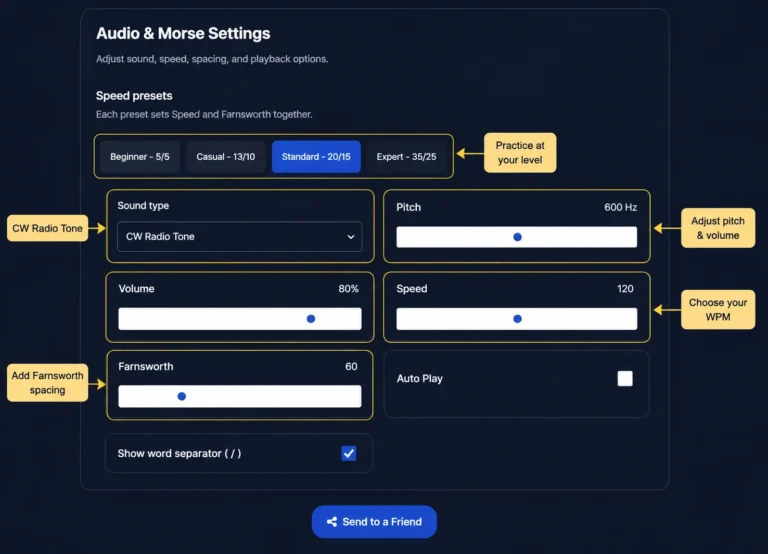
Whether you use it as a text to morse converter, a Morse audio learning aid, or a morse code alphabet translator, all of these features enable you to control the playback rather than sticking to one constant speed
Share, Export, and Explore More Tools
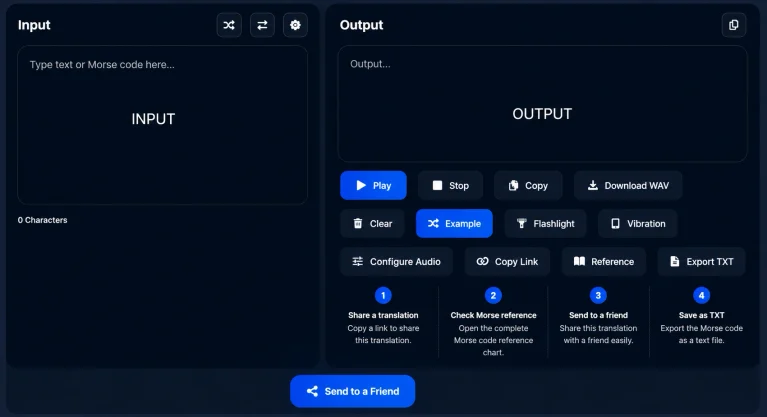
After you have generated a translation, there are multiple ways in which you can save or share your translation. Copy Link allows you to share your translation, and Send to a Friend serves as another option for sharing your translation.
The Reference option is also available in case you want to look up any information about Morse code while translating. With these options, the tool becomes not only helpful for translations but also for learning Morse code.
How to Encode and Decode Morse Code?
Morse code consists of dots (·) and dashes (—), where a combination of both of them denotes a letter, number, and punctuations. Encoding and decoding are nothing but two opposite processes of each other. To encode is to convert normal text into Morse code. To decode is to change the Morse code back into normal text. Once you learn about the rules and spacing involved, the Morse code encoder and decoder will do the job for you.
Decoding: Decode Using a Morse Code Decoder
Morse Code decoding is the process of translating dots and dashes into letters, numbers, words, and messages. Morse Code decoder helps to decode such messages easily and automatically without looking up every character on the table. Using an online Morse code decoder will help you convert Morse code and English text easily without having to individually check each dot and dash.
Example: If you come across this Morse code pattern, it means “HELLO.”
Morse Code: .... . .-.. .-.. ---
Decoded text: HELLO
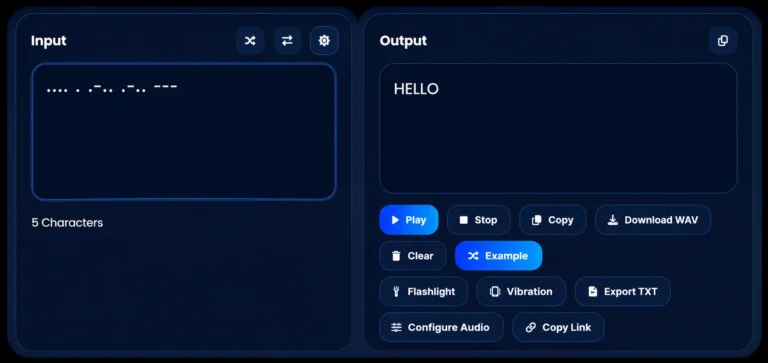
Our Morse code decoder can also function as a Morse code reader where you can input your message and get its translation.
Encoding: Encode using a Morse Code Encoder
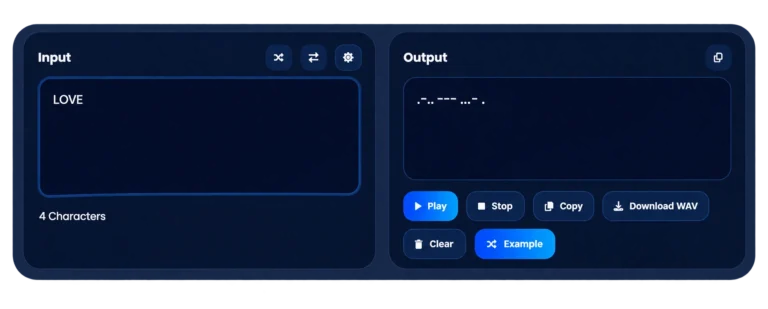
Encoding is the total reverse of decoding. Morse code converter can convert text and words to Morse code, as well as individual English letters and numbers. Now, let’s understand it more quickly with an example.Take a random word like Love morse code and convert to morse code.
Encode and decode each word:
- The letter L is written as
.-.. - The letter O is written as
--- - The letter V is written as
...- - The letter E is written as
.
Feel the Rhythm — It’s the Real Heartbeat of Morse Code
Once you get past the dots and dashes, what you’re actually learning is a rhythm — Morse code works a lot like music, where timing carries the meaning.
- Dot = one beat
- Dash = three beats
- Gap between letters = three beats
- Gap between words = seven beats
Don’t count the beats — just feel the rhythm. Give it time.
Common Morse Code Messages
Explore common words and phrases written in Morse code.
| Word | Morse Code |
|---|---|
| SOS | ... --- ... |
| HI | .... .. |
| HELP | .... . .-.. .--. |
| LOVE | .-.. --- ...- . |
| HELLO | .... . .-.. .-.. --- |
| FRIEND | ..-. .-. .. . -. -.. |
| THANKS | - .... .- -. -.- ... |
| WELCOME | .-- . .-.. -.-. --- -- . |
Give it a try — say it, tap it, or explore Morse code words to practice. Once you catch the rhythm, it just works.
Common Mistakes in Translation of Morse Code
When the Morse code translation seems to be wrong, you can check the format of the input to solve the problem rapidly. These common errors may affect your Morse code translation, so make sure to spot each of them and correct any errors.
No Spaces Between Letters
This is possibly the most widespread mistake. Keep in mind:
- One Morse symbol = one group of dots and dashes.
- Each group should be separated by spaces.
Wrong Word Separators
If your translator uses “/” to separate words, the lack of this symbol will cause several words to appear as one.
Mixing up Dots and Dashes
dot and a dash are not interchangeable.
For instance:
A = .-
N = -.
Just reversing the symbols means changing the character.
Using Incorrect Morse Standard
International Morse and American Morse are different alphabets. If you translate historical telegraph messages, make sure you know the standard of their creation.
Unsupported Symbols
Modern text may contain some symbols that aren’t included in the Morse alphabet.
These can be:
- Emojis
- Decorative symbols
- Some mathematical symbols
- Rare Unicode symbols
If your translator cannot recognize some symbol, replace it with the text that supports the translator.
Check Your Morse Translation for Accuracy
In case the translation of your Morse code is not correct, consider the following five issues to ensure that the translation is done correctly:
- Are there correct dots and dashes?
- Is there spacing between letters?
- Is there proper spacing between words?
- Is it International Morse?
- Does it contain unsupported characters?
These five points will help identify possible errors in Morse code translation and decoding.
International Morse Code vs American Morse Code
When people refer to “Morse code” nowadays, what they have in mind is usually the International Morse Code. Nevertheless, the predecessor of this system, American Morse Code, was used in the initial telegraph landlines.
What Is International Morse Code?
International Morse Code is the internationally accepted system for Morse code transmission. The International Morse Code Translator best for translation of alphabets, numerals, and punctuations which are internationally accepted in to Morse code using the internationally recognized Morse code system.
This is normally related to:
- Amateur radio
- International signaling
- Aviation
- Maritime communication
- Education
- Morse code software
What Is American Morse Code?
The American Morse Code was designed for use in the earliest American telegraph systems. The difference between these codes lies in the patterns of some characters and timings. Since these systems are not equal, using the wrong one may yield unexpected results. If you need the older code, our American Morse Code translator converts it separately.
American standard Related to:
- Telegraph in early America
- American telegraphic messages
- Distinct from International Morse
- Historical records in America
- Decoding American Morse
Which Morse Code Should You Use?
International Morse Code is the standard used around the world today. Start with the Morse code alphabet, then use a Morse code translator to turn text to Morse code, or a Morse code decoder to turn Morse code back to text for studying, practice, and everyday translation.
Always make sure that the program you use follows the International Morse Code and not some obsolete or localized version. Our latest Morse Code Translator facilitates translating, creating, and deciphering Morse code with ease and precision.
Learn Morse Code letters, numbers, and punctuation
We make learning Morse code easier with a simple method. Start by practising the Morse code table and chart to understand how letters, numbers, and punctuation are represented in dots and dashes. Start learning Morse Code easily with our complete tutorial.
Every letter, number, and punctuation mark in Morse code is built from just two elements: a dot and a dash, arranged in a different sequence each time. Below you will find a complete Morse code chart all in one place, covering the full alphabet from A to Z, numbers 0 through 9, and the punctuation marks you need to write a proper sentence rather than just individual words.
Morse Code Alphabet Chart (A-Z)
A .- | H .... | O --- | V ...- |
B -... | I .. | P .--. | W .-- |
C -.-. | J .--- | Q --.- | X -..- |
D -.. | K -.- | R .-. | Y -.-- |
E . | L .-.. | S ... | Z --.. |
F ..-. | M -- | T - | |
G --. | N -. | U ..- |
Morse Code Numbers Chart (0-9)
The Morse code translator numbers will be able to convert digits ranging from zero to nine into their respective codes.
0 ----- | 4 ....- | 8 ---.. |
1 .---- | 5 ..... | 9 ----. |
2 ..--- | 6 -.... | |
3 ...-- | 7 --... |
Morse Code Punctuation & Symbols Chart
. .-.-.- | : ---... | “ .-..-. | ‘ .----. |
, --..-- | ? ..--.. | @ .--.-. | ! -.-.-- |
Want the full alphabet laid out clearly? Head over to our Morse Code Alphabet page — it’s built for exactly that, whether you’re glancing at it mid-practice or printing it out to keep by your desk.
Spot the Pattern, Skip the Memorizing
Here is something that makes learning Morse code much less painful: you are not actually memorizing 26 random symbols. Most of them follow recognizable patterns once you know what to look for.
Start with the shortest ones. E is a single dot. T is a single dash. These are the quickest to learn and also the most common letters in English, so they are worth getting down first.
Repeated dots are easy to pick up by ear. S (three dots) and H (four dots) have a rhythmic, almost tapping quality to them. Once you hear one, the other tends to fall into place naturally.
Some letters are mirror images of each other. A (dot-dash) and N (dash-dot) are exact opposites, and the same goes for several other pairs once you start paying attention. Studying them together means you are really only doing half the work.
Numbers follow their own internal logic. The more dots a number has, the smaller it is – 1 through 5 are dot-heavy. The more dashes, the larger the number – 6 through 9 lean toward dashes, and 0 is five dashes in a row.
If you prefer a more visual approach, there is also a decision tree layout where a dot takes you left and a dash takes you right. Some people find that format sticks even better than pattern recognition on its own.
Once a few of these patterns click, Morse code stops feeling like a memorization exercise and starts feeling more like recognizing a tune you have heard somewhere before.
Do Not Skip Punctuation
A complete message needs more than just letters. A question mark, a comma, a period – these matter. Without them, your message reads like a sentence with no ending. It is a small detail, but it is the difference between something that looks half-finished and something that reads cleanly, whether you are tapping it out, flashing it, or transmitting it as sound.
I L o v e Y o u
.. / .-.. --- ...- . / -.-- --- ..-
Morse Code Sounds- The Pulse Behind the Code
Picture this: You are in a forest, alone, and it is pitch black — yet you hear. Beep… beep-beep… beeeep pattern sound. Someone wants to connect with you — and they are not saying a single word. Haltingly, they are speaking in rhythm — dit and dah, the two heartbeats of Morse code.
And that’s what really makes magic there. Morse code is not just dots and dashes on a page — it is rhythm, which conveys meaning. Based on a system developed by Samuel Morse in the 1830s, which then transmitted messages across oceans and geographies—through telegraph wires, over battlefields, and radio waves. Long before anyone owned a phone.
Every letter has its own beat. A dot (or “dit”) is a short, sharp beep. A dash (or “dah”) is that same tone held about three times longer. Line up enough beeps at the right speed, and what looks like random noise on paper turns into something you can actually hear as language — the same way ham radio operators still send SOS signals and callsigns today using nothing but tone and timing.
Dot vs Dash: The Two Sounds Behind Every Message
Two sounds. That’s all Morse code runs on. A dot (.) is a quick, short beep. A dash (-) is the same tone as a dot, just held out for about three times as long. No other notes, no pitch changes needed. Length and pattern are the only things doing any work here. Every Morse code message is built from just two sounds:
- The dash — a longer beep, roughly three times the length of a dot. This one’s called a “dah.”
- The dot — a quick, short beep. Radio operators actually call this a “dit”.
Samuel Morse didn’t design this alphabet alone — his partner Alfred Vail figured out which letters English uses most, then gave those letters the shortest codes. That’s why E is just one dot and T is just one dash. Common letters, quick sounds.
Once you hear it instead of just reading it, every letter gets its own voice:
- E (
.) — one quick tap. - T (
-) — one long beep. - S (
...) — three fast taps. - O (
---) — three long beeps.
Combining S and O, you end up with one of the most recognizable signals of all time: SOS (short-short-short, long-long-long, short-short-short). The beat almost mimics the sound of your heart rate speeding up. Adopted as the standard distress call in 1906, replacing previous calls such as CQD, SOS was used due to the fact that its pattern can overcome static, wind, or poor connection almost as well as any signal out there. It is the same signal which crackled out of the Titanic in 1912 and continues to be recognized to this very day. There it is. The entire alphabet, consisting of only two signals.
Hearing a Word Come Together
Type “HELLO” into a translator and press play, and you’ll hear it as five distinct little bursts of rhythm — one for each letter, run together into something that starts to sound less like code and more like a short tune. That’s usually the moment Morse code stops feeling abstract: you’re not staring at symbols anymore, you’re recognizing a sound.
The Gaps Matter as Much as the Beeps
The part beginners usually miss is timing. A dot is one beat. A dash is three. The pause inside a letter is short, the pause between letters is longer, and the pause between words is longer still. Skip the spacing and even correct dots and dashes turn into noise — the rhythm is doing half the work.
Train Your Ear
Learning Morse by sound works a lot like learning an instrument — awkward at first, then suddenly familiar. A few things that help:
- Kick things off with short, everyday words like HI, YES, or NO rather than just random letters.
- Tap the rhythm out with your finger while you listen — it helps the timing stick.
- Try guessing the letter before you see it written out, so you’re training recognition, not just reading along.
Common Morse Code Translations
Some words and phrases get searched (and translated) far more than others. Whether it’s a distress call, a heartfelt message, or a simple greeting, these are the most popular Morse code translations people look up — try any of them in the Morse Code Translator above. Enter your word or sentence in the Morse code writer input box to get it translated into Morse code.
| Phrase | Morse Code | Category |
|---|---|---|
| SOS | ... --- ... | Distress signal |
| HELP ME | .... . .-.. .--. / -- . | Emergency |
| I LOVE YOU | .. / .-.. --- ...- . / -.-- --- ..- | Love/emotion |
| MISS YOU | -- .. ... ... / -.-- --- ..- | Love/emotion |
| GOOD MORNING | --. --- --- -.. / -- --- .-. -. .. -. --. | Greeting |
| GOOD NIGHT | --. --- --- -.. / -. .. --. .... - | Greeting |
| THANK YOU | - .... .- -. -.- / -.-- --- ..- | Greeting |
| HELLO | .... . .-.. .-.. --- | Greeting |
| 73 (Best Regards) | --... ...-- | Radio shorthand |
| CQ (Calling Any Station) | -.-. --.- | Radio shorthand |
Why these translations matter
SOS is the world-wide most known distress signal, a Morse code often transmitted by ships, aircraft and the military to ask for help. Certain translations of I love you and miss you are top searches for tattoos, engraved jewelry or anniversary gift ideas, as a mouthful of coloured dots and dashes – even if not understood by any other human on that realm – seems somehow more personal than text. As beginners first get started with the alphabet, translating easily recognizable words like “hello,” “yes,” and “no” every time they hear them, shorthand like 73 and CQ comes straight from ham radio culture where it is ubiquitous in amateur radio exchanges.
Want to try one yourself? Just type any word or phrase into the translator above and see (or hear) it instantly converted into Morse code.
Improve Your Morse Code Skills
Improving in Morse code is not just about learning the dots and dashes — it is about literally learning to “hear” (with your brain) what each sequence sounds like, which takes time and hours of training. The techniques below that have been proven to work, used by novices and experienced ham radio operators, will help you speed up your learning process while retaining what you learn.
- Spend little time every day: 30 minutes once a week is far worse for building familiarity than daily practice. Remember – consistency trumps intensity EVERY TIME.
- Accuracy over speed: Start slow, and allow speed to come on its own. Rushing too early sets up poor habits that you cannot easily address.
- Learn by sound, not sight: View Morse as a rhythm language rather than a chart. Where the identity of a letter is its “dit-dah” pattern.
- Farnsworth method: A highly recommended approach (mainly around ham radio circles) with each letter in full speed but spaced out further apart at first and closing the gaps as you improve.
- Use mnemonics for difficult letters: Associating a challenging letter with another sound, word, or sign (for instance, connecting a character pattern to a commonly heard phrase) makes it much faster to recall.
- Watch the weak points: when you review to get in extra practice time, concentrate on the given letters or numbers that continue to be missed rather than going through all of them equally.
- Move from just letters to common words and prosigns: Once you have the random flashes of letters down, progress to real words followed by adding shortcut codes that are used in actual radio speech like CQ, QTH, 73.
- Be a part of the community: Ham radio clubs, Discord servers, and even Morse code-related message boards are great for feedback, motivation, and having weekly decoding challenges
- Make it a game: whether you are testing yourself with flashcards, or using a Morse code translator to check old code.
Want to challenge yourself based on what you’ve learnt? Type a word in the translator above, and then translate it to see how fast you can interpret it by ear.
Where Morse Code Is Still Used Today
Samuel Morse died in 1872, but his code never truly retired — it just found new corners in the modern world. Pilots continue to receive it from aviation beacons, ham radio operators still send it as dot-dash Morse code (CW), and assistive technology — such as Google’s Gboard keyboard — transmutes it into a lifeline for the physically challenged. Outside those industries, casual users still face a Morse code translator to encode text in Morse signals or decode audio messages, or simply study the alphabet for fun. From military backup communication to escape room puzzles, Morse code has managed to outlast almost everything that was built to replace it.
Amateur Radio (HAM)
Morse — specifically CW, or continuous wave — is still an active, licensed radio mode, kept alive by operators who use it by choice rather than necessity. Its real advantage is range: a Morse signal can often get through weak or noisy conditions where voice communication breaks down entirely, which is part of why the amateur radio community has never really let it go.
Aviation Navigation
Some airport navigation beacons still identify themselves in Morse code — a short repeating pattern that confirms to a pilot they’re tuned to the right station. It’s an old-fashioned backup layered under modern GPS systems, still trusted because it’s simple and hard to get wrong.
Emergency and Rescue Signals
SOS — three dots, three dashes, three dots — remains the most universally recognized distress signal there is, and it doesn’t need a radio to work. A flashlight, a mirror, even tapping on metal can carry it. It’s still taught in survival and maritime training for exactly that reason: it works when almost nothing else does.
Gaming and Puzzles
Morse shows up regularly in puzzle games and escape rooms, where a string of blinking lights or beeps becomes a clue players have to decode by ear or eye. It’s a natural fit for that kind of design — simple enough to teach on the spot, satisfying to crack.
Accessibility Tools
Google’s Gboard keyboard includes a genuine Morse code input mode, letting users type by tapping short and long touches instead of using a standard keyboard — a real, current example of 19th-century code solving a modern accessibility problem for people with limited mobility.
Education and STEM
Morse code is a hands-on way to teach binary logic and timing: a signal is either on or off, short or long, and meaning is built from those two states — the same idea computing is built on, made physical; it’s a staple of coding workshops and electronics projects for just that.
Why Choose Our Morse Code Translator?
Whether you are translating a short note, learning the International Morse Code alphabet, or preparing for amateur radio (CW) communications — choosing the right tool makes a difference. Unlike other tools, which merely convert text into dots and dashes, this translator was made to help you translate, decode, listen to your translation, and practice translating Morse code from audio input or visual (light) signals — all on a single page!
Our Text to Morse Code and Morse Code to Text Converter is based on accuracy, expediency, and ease of use. It is ideal morse code website for students, teachers, radio operators, puzzle enthusiasts, and everyone interested in Morse communication.
Accurate International Morse Code Translation
The core prerequisite for Morse code translation is accuracy. Any single error in a dot, dash, or spacing will completely alter the meaning of a message. This tool strictly adheres to the ITU-mandated global universal international Morse code standard, and covers all application fields including amateur radio, aviation services, maritime communications, emergency signals, and educational institutions. All letters, numbers, and punctuation marks supported for translation follow standardized formats. Whether converting simple greetings or decoding long messages, its outputs conform to international specifications, and its results follow the international standard.
Instant Text to Morse Code & Morse to Text Conversion
This Morse code conversion tool updates its output in real time as users enter input. It converts in both directions: text to Morse code, and Morse code back to English — so it also works as a Morse code decoder. It is useful for testing vocabulary, verifying translations, and learning new code characters.
Learn Morse Code While You Translate
Unlike typical converters, which only give you dots and dashes, our translator is an interactive exercise. All the translations serve to learn how Morse code works by merging practical conversions and learning tools, as follows:
- Real-time Morse code audio playback
- Flashing light signal visualization
- Adjustable transmission speed
- Live character and signal counters
- Interactive examples
- Complete Morse code reference charts
From the first letter you learn to write full sentences, this tool will help you practice recognition skills as you use it.
Beginners, Students & Professionals
Our translator is suitable for users of all experience levels.
It’s commonly used by:
- Students learning Morse code
- Teachers creating classroom activities
- Amateur (HAM) radio operators practicing CW
- Scouts and outdoor enthusiasts
- Aviation and maritime learners
- Escape room designers
- Puzzle creators
- Developers working with signal encoding
- Anyone interested in Morse communication
Whether you’re decoding your first message or improving your transmission speed, the tool grows with your skill level.
Built for Learning, Not Just Translation
We believe a great Morse Code Translator should do more than convert text. That’s why our platform combines practical tools with educational resources to help you understand:
- The Morse Code alphabet
- Numbers and punctuation
- Character spacing rules
- Timing and rhythm
- Audio recognition
- Common Morse code phrases
- Real-world communication techniques
Instead of simply generating dots and dashes, the translator helps you build lasting Morse code knowledge.
Fast, Free & Unlimited
You can use our free Morse Code Translator as often as you like.
There are:
- No subscriptions
- No registration requirements
- No download limits
- No hidden charges
- No usage restrictions
Whether you’re translating one word or hundreds of messages, you’ll always have unlimited access to the core features.
Why Use Morse Code?
The Morse Code is a complete, all-in-one resource for converting simple text into full Morse code. It is not limited to only communicating in emergencies; it is a great tool for artistic utilisation. You can elevate your personal experience and translate your normal text into rhythmic sounds and patterns. This tool is a complete hub for every character. Experience our Morse Machine to hear Morse code, feel its vibrations, and watch it flash in light.
- The interface is beginner-friendly, and even newbies can use it conveniently.
- The translations are accurate and perfect, whether it is coded or in text form.
- No limitations; the tool is itself free and can be used limitlessly.
A Simple Idea That Never Really Left
Morse code doesn’t need electricity, a screen, or even a shared language — just rhythm. That’s most of why it’s outlasted the technology it was built for. It moved from telegraph wires to radio waves to smartphone keyboards without really changing at all: still just two sounds, arranged with enough precision to mean something.
Origin of Morse
The translation system was initiated in the 1830s, and the authentic system of dots and dashes was developed by Samuel Morse and Alfred Vail in 1837 and revealed publicly in 1838. People used these signals to send messages quickly over long distances, long before telephones existed. The first message on the new Washington–Baltimore line in 1844 was “What hath God wrought”.
Frequently Asked Questions
How do I translate Morse code with a translator?
To decode Morse code using a translator, input the dots and dashes in the Input field. They would be translated to normal text in the Output field automatically. For example, .... . .-.. .-.. --- is HELLO.
Who invented Morse code?
Morse code was developed in the 1830s by Samuel Morse and Alfred Vail, with its dot-and-dash system introduced in 1837 and publicly shown in 1838.
how to decode morse code?
Morse code is decoded by breaking down the dots (.) and dashes (-) in the message into letters and then looking up their equivalent letter in the Morse code alphabet. Example: .... . .-.. .-.. --- means HELLO. This can be done instantly using a Morse code translator.
How to read Morse code?
Reading Morse code involves recognizing dot and dash patterns. First of all, you have to study the international Morse code chart(letters and numbers) for better understanding and reading. Practice regularly to memorize Morse quickly.
How to learn Morse code?
Learning Morse code becomes easier with a simple, structured method. Study the Morse code table and chart to understand how letters, numbers, and punctuation are formed using dots and dashes.
How to write in Morse code?
Writing Morse code requires converting each letter and number into its corresponding pattern of dots and dashes, as indicated by a Morse code chart. Letters should be separated by a space, while words are divided by a forward slash (/). Start from common phrases like Hello, Hi.
How to say I love you in Morse code?
We say “I love you” in Morse code as (.. / .-.. --- ...- . / -.-- --- ..-).
How to Say Hello in Morse Code?
HELLO in Morse code is .... . .-.. .-.. ---.
What is SOS in Morse code?
In Morse code, the SOS signal is shown as three short beeps, three long beeps, and three short beeps (SOS).