Morse Code translator Audio
Upload a Morse audio file or use your microphone to decode into text instantly.
What is Morse Code Audio Decoder?
The Morse code adaptive audio decoder is a powerful tool for converting Morse audio files into simple and clear English text instantly within seconds. This audio decoder analyzes input Morse signals (dots and dashes) and translates them into text, like our Morse code translator to convert text ot morse, in real-time decoding. Moreover, you can also play your Morse code audio. This tool provides you with a satisfying user experience as it decodes accurately if valid audio is provided as input.
Why do you need a Morse Code Audio Translator?
We need an online audio decoder because decoding audio manually is much harder in a noisy background, which sometimes causes wrong audio decoding. This Morse audio decoder helps you to decode audio files accurately without wasting time in manual decoding . A Morse code sound translator can be useful when you need to turn Morse code audio into readable text quickly and avoid the difficulty of decoding dots and dashes manually. This tool is widely used for experimental purposes.
How to use the Morse Code Audio Decoder?
It’s very easy to use our simple Morse code audio decoder. Just follow these easy steps to use the Morse code audio to text translator and convert Morse audio into readable text.
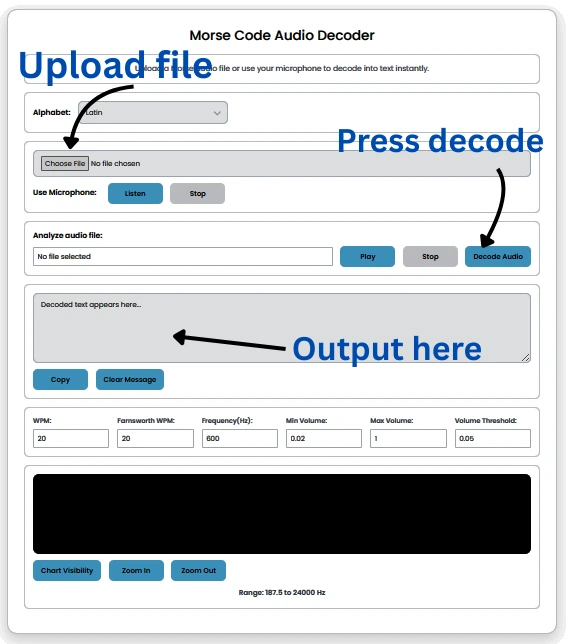
- Step 1 Start by uploading an input audio file or using a microphone for input.
- Step 2 Select an alphabet language such as Latin, Hebrew, Arabic, Persian, or Japanese. Latin is the default.
- Step 3 Press the play button to listen to the Morse code audio file.
- Step 4 You have to tap the “Decode” button to transform the input file into plain text. Now, you can see the text in the desired box.
- Step 5 Press the copy button to copy the decoded output.
- Step 6 If you want to empty the output box, click the clear button to remove output.
- Step 7 Our tool also shows Morse code waves. You can see real-time decoding signals in the chart at the bottom.
Pros of using Audio Decoder
Speed and Accuracy
The Morse code audio decoder provides you with fast and accurate Morse audio file decoding in just one click. Our tool reduces human error in decoding files and provides output without a single error.Reliable Decoding
The Morse code audio decoder analyzes signals automatically and provides you with accurate results. This tool helps you to reduce manual decoding errors and provides you with exact and reliable decodingTime Saving
Manual decoding is time-consuming and raises accuracy concerns for beginners, whereas this advanced audio decoder automatically converts audio files and delivers accurate results in seconds.
Cons of Manual Decoding
Inefficiency
Manual decoding consumes much time as we need to listen to Morse code carefully, and it requires skills and experience. Manual decoding also has doubts about errors, and it will not be as accurate as a tool.Human Errors
While manual decoding by beginners, there must be human errors in decoding because manual decoding requires high skill and experience.Noisy Environments
It’s a challenge for a manual decoder to decode Morse in a noisy environment, which causes errors.
Best features of Morse Code Audio Decoder?
Upload Morse Audio File
You can upload a Morse audio file as input to decode it into text instantly. If you don’t have an audio file, then use our Morse code translator to generate or save a file.Decode Morse with Microphone
Another option is to use a microphone for input. Note: Some browsers may ask for permission or will not allow it.Recommended audio file.Support for Multiple Alphabets
Our tool provides you with multiple language support, such as Latin, Cyrillic, Greek, Hebrew, Arabic, Persian, Japanese, Korean, and Thai. Latin is the default.Audio Play and Stop Controls
After uploading the input, you can also play the Morse audio file and press the stop button to pause the audio playback.Instant Decoded Text Output
Our tool provides you with instant results in seconds just after you click on the decode button, and the result will appear in the box below.Copy and clear
You can copy your output just by clicking on the copy button, and clear the empty output box by clicking on the clear button.Audio Signal Visualization
Not only do you play, decode, copy, and clear output, but you can also see a live decoding sound waves visualization chart that helps you to understand Morse code sound just by analyzing dot and dash waves.
Tips for best results
Frequently Asked Questions
How long does it take to process large audio files?
You just need to upload files and click the decode button, and instantly the output will appear. Remember, the tool did not decode punctuation symbols.
Is there a file size limit for the decoder?
No, there is no file size limit as our tool decodes audio files of any size and unlimited files.
What audio formats does the decoder support?
Our tool supports MP3, WAV, OGG, M4A, and other common formats.
Is the decoder safe and reliable?
Yes, our audio decoder is totally safe and reliable. We ensure that your data and privacy are fully protected, and there will be no compromise.
Does the decoder support real-time decoding?
Yes, our decoder supports real-time decoding.
Can the decoder handle audio with noise?
YES, this tool can handle audio noises, but too much background noise will cause disturbance in results, so make sure to use a translator and then save the audio file.